
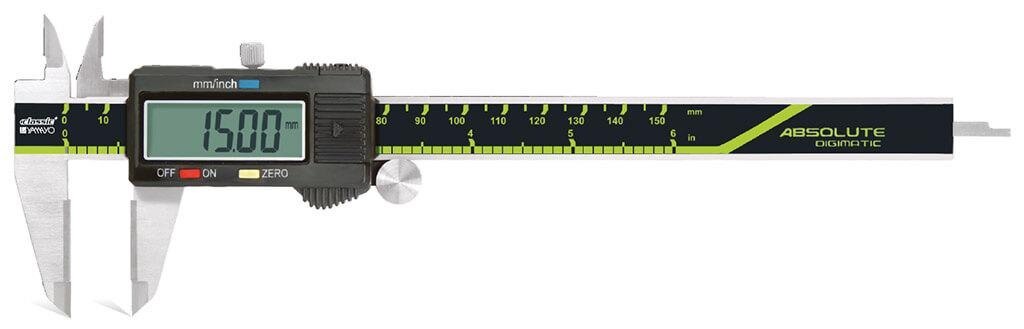
A quoted caliper package can contain far more than the instrument, and “Digimatic” does not guarantee that a data cable, software interface, or traceable calibration report is included. By checking the physical contents, specifications, operating method, and purchase documentation, you can match the caliper to your parts and avoid paying for accessories or accuracy you did not receive.
Key takeaways
- Confirm the caliper includes carbide-tipped jaws, depth rod, display, and step faces.
- Match measuring range and jaw geometry to your part’s dimensions and access points.
- Ask whether Digimatic output needs a cable, interface, or data-collection software.
- Require accuracy, resolution, battery, calibration, and included accessories in the quotation.
Identify every item that should be in the package
A complete digital carbide jaw caliper package starts with the assembled caliper body, not loose carbide inserts. Confirm that the model has carbide-tipped external measuring faces and the specified internal jaw faces; the beam, slider, depth rod or blade, step-measuring faces, display, and control buttons are also part of the instrument.
Check the quotation for every item below:
- The digital carbide jaw caliper with its stated jaw range and measurement functions.
- External and internal carbide jaw assemblies, with no chipped or loose tips.
- Depth rod or depth blade and usable step-measuring faces.
- The correct operating battery, including its type and fitted status.
- A spare battery, if promised; do not assume one is included.
- A protective case or storage box sized for the caliper.
- The manufacturer’s operating and care instructions.
- A calibration or inspection certificate. For industrial inspection, request a traceable report showing readings at multiple points, not a certificate that records only a zero check.
- Data-output accessories, if the model is described as Digimatic: connector, cable, wireless transmitter, receiver, or software interface.
Digimatic is not a guarantee that a cable, transmitter, or receiving software comes in the box. Ask the seller to state each included accessory, battery specification, certificate type, warranty document, and return arrangement on the purchase order.
A quoted digital carbide jaw caliper can otherwise arrive complete for hand measurement but unusable for your data-collection system.
Match the range, accuracy, and jaw geometry to your part
Choose a caliper whose range, accuracy, and jaw shape cover the part without forcing the jaws onto an edge or into a corner.
A 150 mm model with 0.01 mm resolution and stated accuracy around ±0.02 mm suits general comparative work, but resolution is not accuracy; confirm the model’s maximum permissible error, repeatability, and temperature conditions.
| Specification | What to check | When it matters |
|---|---|---|
| Range | Maximum outside, inside, and depth capacity | Reject the caliper if the part approaches either end of the travel |
| Accuracy | Stated accuracy or maximum permissible error, not the display increment | A 0.02 mm tolerance can exceed a caliper rated at ±0.02 mm |
| Jaw geometry | Carbide outside faces, inside-measuring tips, jaw thickness, and tip reach | Thin walls, grooves, steps, and narrow slots need suitable contact surfaces |
| Functions | Outside, inside, depth, and step measurement | Match the available faces to the dimensions on your drawing |
Carbide jaws resist wear when you measure rough, abrasive, or cast surfaces, but they do not correct poor alignment. Seat both jaws squarely, use consistent contact pressure, and check repeatability on a known reference.
If the tolerance approaches the stated accuracy, or you need roundness, bore form, or feature location, use a micrometer, bore gauge, height gauge, or CMM instead. Before ordering carbide jaw calipers in Jaipur, request the exact jaw range and geometry from the quotation rather than relying on the product title.
Check what “Digimatic” adds to the data-collection setup
Do not assume that “Digimatic” means a data cable is included. A Digimatic carbide jaw caliper may contain the measuring electronics and an output port, while the cable, receiver, wireless transmitter, or interface is supplied separately. Without that link, you can read the LCD but cannot send measurements into an SPC system.
Absolute and incremental measurement, zeroing at any slider position, millimetre/inch conversion, and LCD display describe the caliper’s operating functions. They do not prove that it can transmit data. Confirm that the model is a genuine Digimatic data-output instrument rather than an electronic caliper with display-only electronics.
Before placing the order, verify each part of the connection:
- Identify the connector on the caliper and the required cable or wireless transmitter; similar-looking plugs are not automatically interchangeable.
- Ask whether the quotation includes the data cable, receiver, interface unit, and any measuring software, or lists them as separate items.
- Obtain the output protocol or communication specification and match it with your SPC software, Excel workflow, data logger, or machine-control system.
- Confirm how the reading is triggered: a data button, foot switch, remote signal, or automatic transmission.
- Request a complete connection test using your receiving equipment before approving the purchase.
Have the purchase order name the caliper model, interface parts, connector type, protocol, and software compatibility. A displayed 0.01 mm resolution does not guarantee reliable records if the interface drops readings or sends the wrong format.
Use the caliper without creating a false reading
A false reading starts with dirt, tilt, or excessive jaw pressure, not with the display. Wipe the part and measuring faces, remove chips from the beam and depth rod, then close the digital carbide jaw caliper gently and press zero.
Confirm the battery indicator is normal; a fading display can turn a sound measurement into a rejected part.
1. For an outside dimension, open the carbide-tipped jaws wider than the part, place them squarely across the feature, and close until both faces make light contact. Do not rock the slider or squeeze the jaws; measure at the widest point of a round part and repeat once to check consistency.
2. For an inside dimension, use the smaller upper jaws and seat both tips fully against the internal surfaces. Keep the caliper aligned with the bore axis. Tilting it across a hole reports a value larger than the true diameter.
3. For depth, place the beam end flat on the reference face before extending the depth rod or blade. Keep the rod perpendicular to the bottom; an angled rod measures a diagonal.
4. For a step dimension, rest one step-measuring face on each level and keep the beam parallel to the part. Do not use the outside jaws for a narrow step they cannot seat on.
5. Wipe coolant and abrasive dust away after use, retract the rod, close the jaws without force, and store the instrument in its case. Keep coolant out of the digital module, avoid dropping the caliper, and remove the battery for long-term storage.
Turn a Jaipur quotation into a complete purchase specification
Confirm every line of the quotation before ordering; Jaipur availability does not prove that the required accessories or support are included. Do not treat “digital carbide jaw caliper for included in Jaipur” as an inclusion list.
1. Record the exact model, 150 mm or other range, 0.01 mm resolution, stated accuracy or maximum permissible error, repeatability, display units, and jaw geometry. A 0.01 mm resolution is not ±0.01 mm accuracy.
2. List the supplied parts: carbide external and internal jaw assemblies, depth rod or blade, step-measuring faces, operating battery, spare battery, protective case, instructions, and any data cable, transmitter, or software.
3. Confirm that the certificate is a traceable calibration report with readings at multiple points. A zero-check sheet is not equivalent to calibration documentation.
4. If you need Digimatic output, specify the connector, output protocol, cable or wireless compatibility, and receiving software. Confirm which items are included and which are extra.
5. Write down the battery type, expected life, automatic shut-off, low-battery warning, replacement availability, and protection rating. Ask for the exact IP or coolant-resistance specification; it does not authorise immersion or high-pressure washing.
6. Confirm warranty duration, Jaipur service or return arrangements, calibration turnaround, lead time, dispatch origin, and acceptance conditions for a defective instrument.
For carbide jaw calipers in Jaipur, Yamayo Instruments can clarify whether a quoted model is locally stocked or supplied through another city, a distinction that changes delivery and return planning. Have the supplier attach this checklist to the purchase order.
Related product
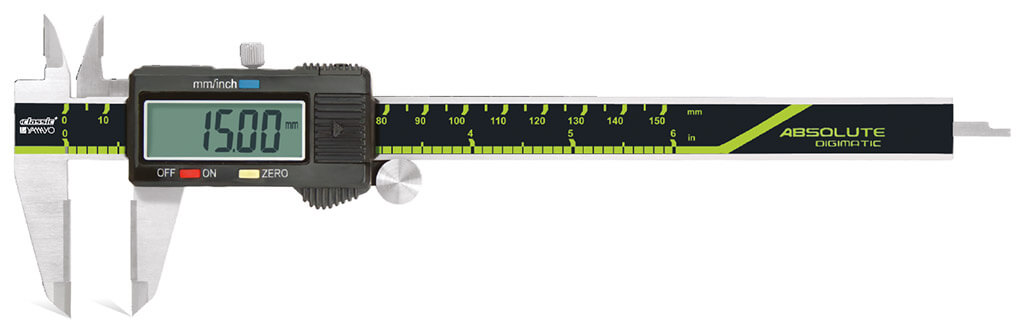 | Calipers Digimatic Calipers with Carbide Jaws Digimatic Calipers with Carbide Jaws The Digimatic Caliper with Carbide Jaws is a precision digital measuring instrument engineered for accurate... View product → |
Frequently asked questions
What should a digital carbide jaw caliper package include?
Confirm the assembled caliper body, carbide-tipped external measuring faces, specified internal jaw faces, beam, slider, depth rod or blade, step-measuring faces, display, control buttons, battery, and stated accessories.
How do you match a carbide jaw caliper to a part?
Compare the part’s maximum dimension with the caliper range, then check accuracy, resolution, jaw thickness, jaw reach, and whether the jaw geometry can contact the feature squarely.
What does Digimatic add to a carbide jaw caliper setup?
Digimatic provides a digital data-output connection on compatible instruments; confirm the required cable, data interface, software, and connector before ordering.
How can you prevent false readings with a digital carbide jaw caliper?
Clean the jaws and part, close the jaws without force, keep them square to the feature, avoid rocking the slider, and verify zero before measuring.
What should a Jaipur quotation specify?
Request the manufacturer and model, range, resolution, accuracy, jaw dimensions, carbide-jaw configuration, Digimatic output, battery, calibration documents, warranty, delivery, taxes, and included accessories.